Don’t let improvement stop at the worksheet
Your team already uses Lean tools. The hard part is keeping the work going after the meeting, audit, or workshop. Keep SOPs, fishbones, Kanban cards, Kamishibai boards, and Hoshin Kanri alongside the ideas, actions, and measures they support.
Start with the part of your improvement work that keeps getting stuck.
Ideas stall between proposal and follow-through
Turn an improvement idea into visible next steps instead of another item in a spreadsheet.
The same problems return without a shared countermeasure
Give the team a common root-cause view and a structured way to carry the response through.
Standard work gets lost on the shop floor
Keep the current instruction close to the work, with a clear published version for the people doing it.
Daily controls disappear into spreadsheets and whiteboards
Make checks, scores, and replenishment status available for the daily review.
Strategy loses its link to monthly action
Connect long-range intent to targets, owners, and countermeasures that can be reviewed throughout the year.
Ideas stall between proposal and follow-through
Turn an improvement idea into visible next steps instead of another item in a spreadsheet.
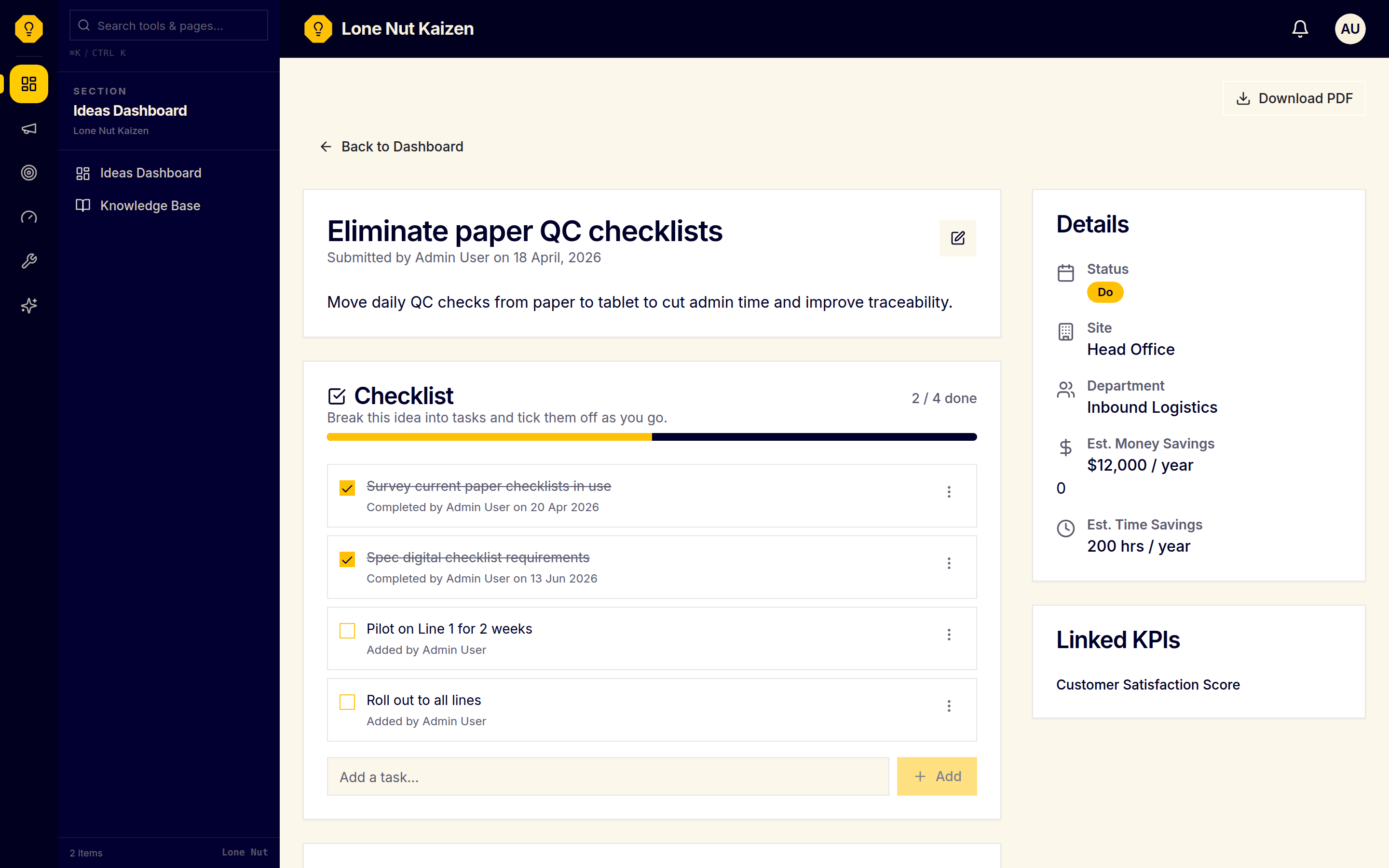
Idea Task Checklists
Keep implementation steps beside the idea.
Ideas lose momentum when the next actions live in meeting notes or a separate tracker. Break implementation into concrete checklist steps beside the idea, record who completed each task, and review progress on the idea detail page.
The problem to solve
Improvement ideas lose momentum when the next actions live in meeting notes or a separate tracker instead of beside the idea.
Using the tool
- 1Open an idea in the dashboard and add the concrete implementation steps as checklist tasks.
- 2Tick a task complete when the work is done; the app records who completed it and when.
- 3Rename or delete a task as the plan changes, and use the progress bar to see completed versus open tasks.
- 4Return to the idea detail page during the huddle to review the checklist with the rest of the idea record.
What stays visible
The idea has a completion count and an activity trail. Checklist changes do not change the idea's PDCA status automatically, so the status remains an explicit team decision.
- Add tasks under any idea and keep the plan beside the idea record
- Tick off, rename or delete tasks as the work evolves
- Completion records include the person and time for each finished task
- Progress is visible on the idea detail page; it does not update PDCA automatically
- Available on Lite and above; does not use AI credits
The same problems return without a shared countermeasure
Give the team a common root-cause view and a structured way to carry the response through.
Fishbone (Ishikawa) Diagrams
Work through the 6 Ms with the team.
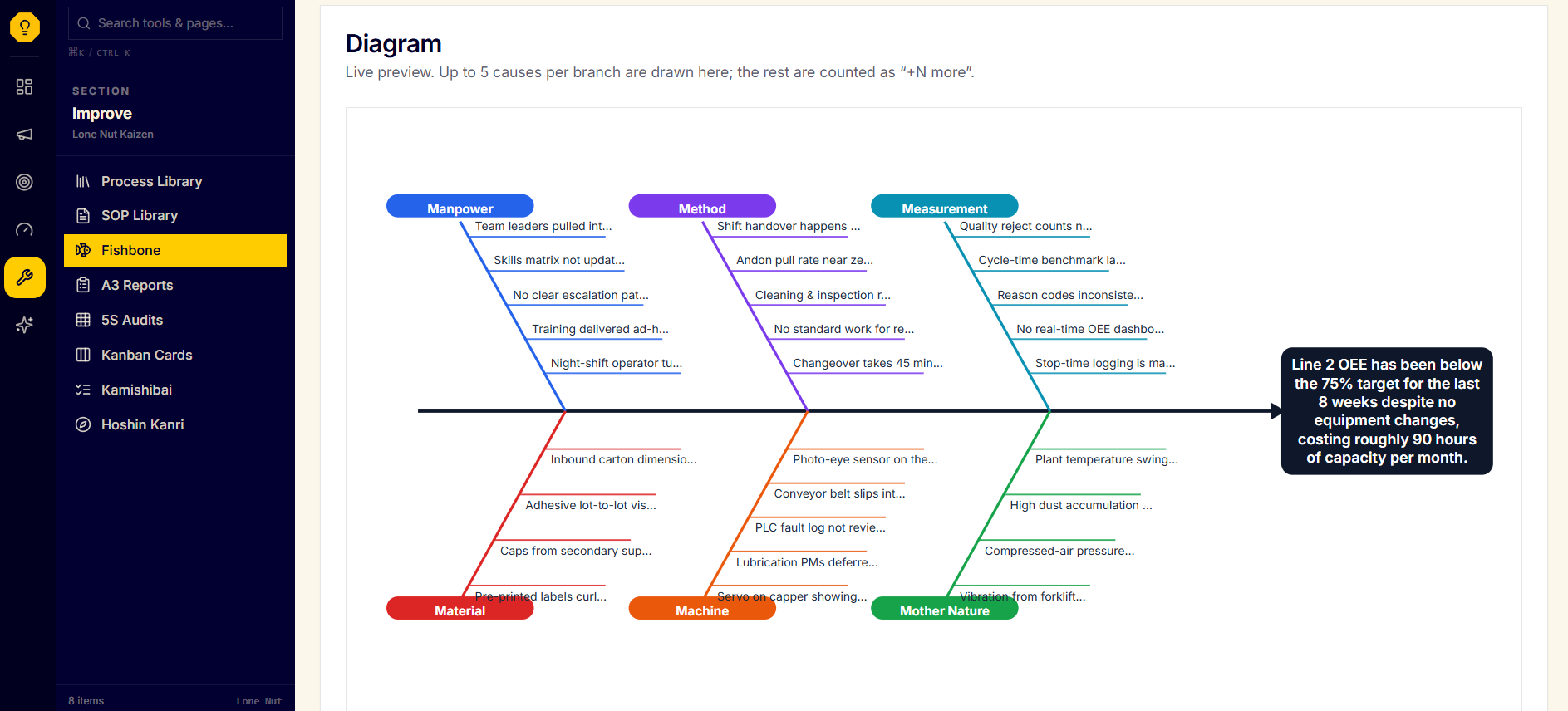
Problem-solving often ends with a whiteboard photo and no shared next step. Create a digital Ishikawa for each problem, capture causes across the 6 Ms—Manpower, Method, Machine, Material, Measurement, and Mother Nature—and give the team a diagram it can review and edit.
The problem to solve
Root-cause sessions produce scattered notes or a whiteboard photo, so the team leaves without a shared view of what to investigate next.
Using the tool
- 1Write the problem statement and open the six standard branches: Manpower, Method, Machine, Material, Measurement and Mother Nature.
- 2Add, remove and reorder possible causes inline while the team works through the evidence.
- 3Use the optional 5 Whys drill-down on a cause when the team needs to test what sits underneath it.
- 4Save the diagram as the shared working view and promote a well-understood cause to an improvement idea when appropriate.
What stays visible
A saved cause map gives the team a common starting point for countermeasures and preserves the reasoning after the meeting.
- Pre-built 6M categories — Manpower, Method, Machine, Material, Measurement and Mother Nature
- Add, remove, and re-order causes inline
- Save the diagram as the team works
- Optional 5 Whys AI drill-down for a selected cause
A3 Problem-Solving Reports
Keep problem-solving from context through follow-up.
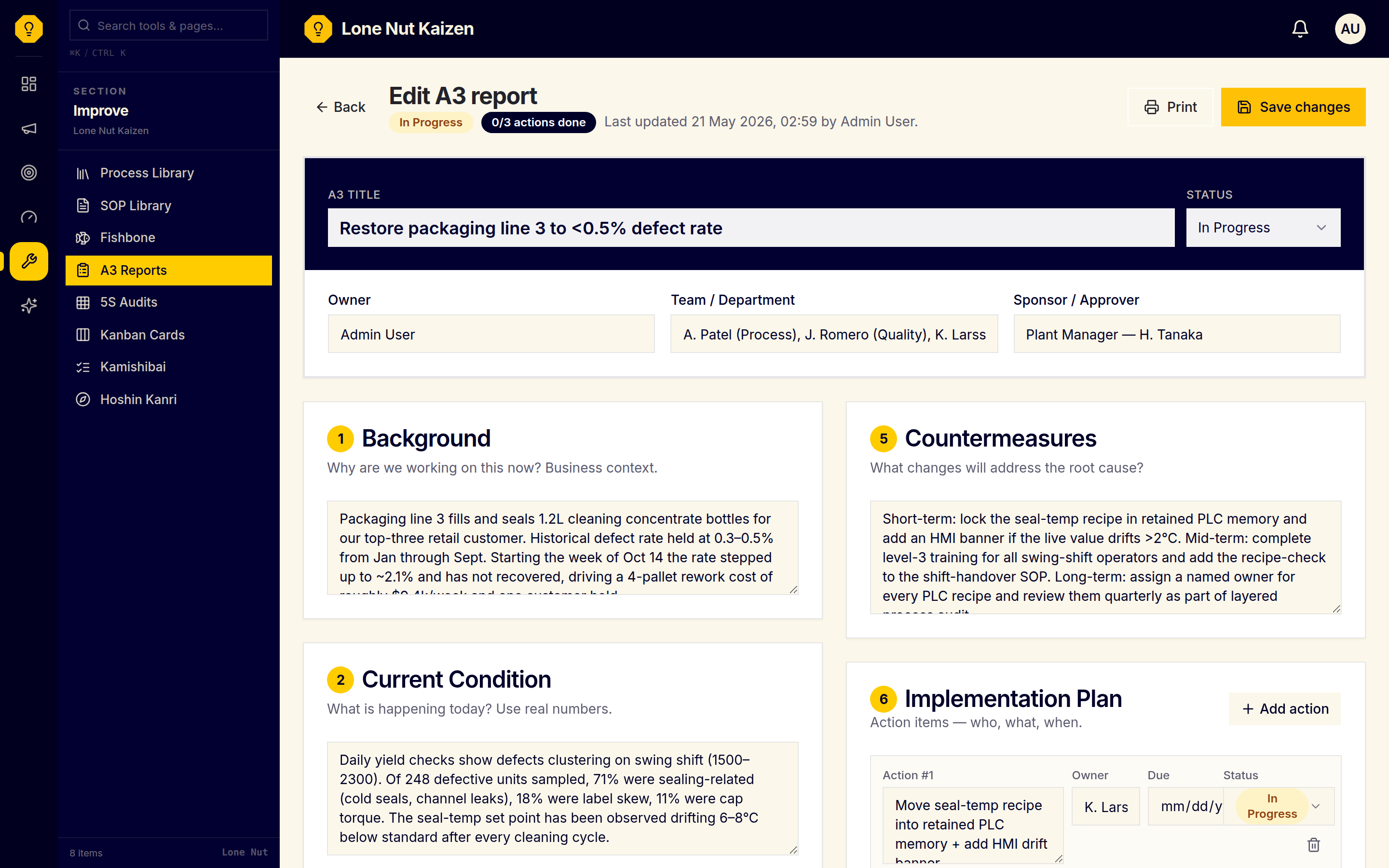
Problem-solving loses momentum when analysis, countermeasures, and follow-up are split across slides and action lists. Work through the seven-step A3 on one fillable page, assign owners and due dates, link a Fishbone when useful, move the report from Draft through In Progress to Complete, and print it from the browser.
The problem to solve
Problem-solving gets stuck between analysis and implementation when the context, countermeasures and follow-up are split across slides, notes and action lists.
Using the tool
- 1Create an A3 and work through Background, Current Condition, Goal and Root Cause.
- 2Add countermeasures and implementation actions with an owner, due date and status.
- 3Link an existing Fishbone when it contains the root-cause work the A3 is building on.
- 4Move the report from Draft to In Progress to Complete, then print the one-page report for the review or shop floor.
What stays visible
One structured problem-solving record keeps the reasoning, owners, and follow-up together for the next review.
- Seven standard A3 sections laid out in two columns on desktop and stacked on mobile
- Action-items table with owners, due dates, and status
- Optional link to an existing Fishbone for root-cause analysis
- Draft → In Progress → Complete status flow
- Print-friendly layout for sharing the finished A3 on the shop floor
- Available on Starter and Pro; does not use AI credits
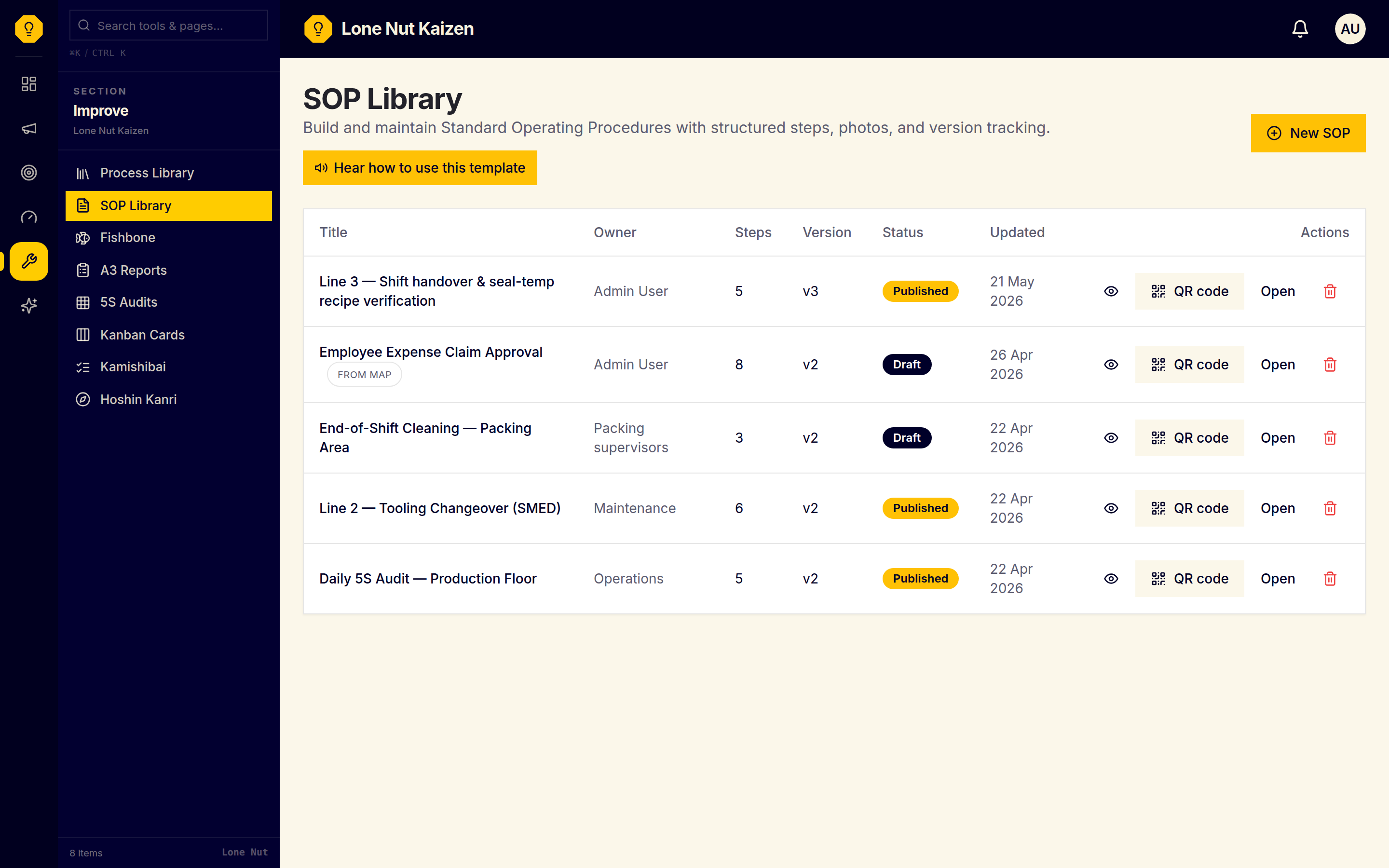
Standard work gets lost on the shop floor
Keep the current instruction close to the work, with a clear published version for the people doing it.
SOPs + QR Codes
Keep the current standard work near the job.
Standard work is hard to follow when the current instruction is buried in a binder or an old file. Build procedures with steps, photos, notes, and color-coded safety, quality, or information callouts; publish the approved version and place a printable QR code at the machine.
The problem to solve
Instructions in Word files or binders go stale, and operators cannot tell which version is the one to follow at the machine.
Using the tool
- 1Create an SOP with its purpose, owner and structured work steps.
- 2Add photos, notes and safety, quality or information callouts where the operator needs them.
- 3Keep the procedure in Draft while it is being reviewed, then publish the approved version.
- 4Print the QR poster and place it at the machine; operators scan it for the latest mobile-friendly version.
What stays visible
One published source of standard work with version history and a QR route to the current instruction.
- Step-by-step editor with photos, notes, and safety / quality callouts
- Draft → Published workflow with version history
- Printable QR posters that point to the latest published version
- Mobile-friendly shop-floor view for signed-in organization users
Daily controls disappear into spreadsheets and whiteboards
Make checks, scores, and replenishment status available for the daily review.
5S Audit Boards
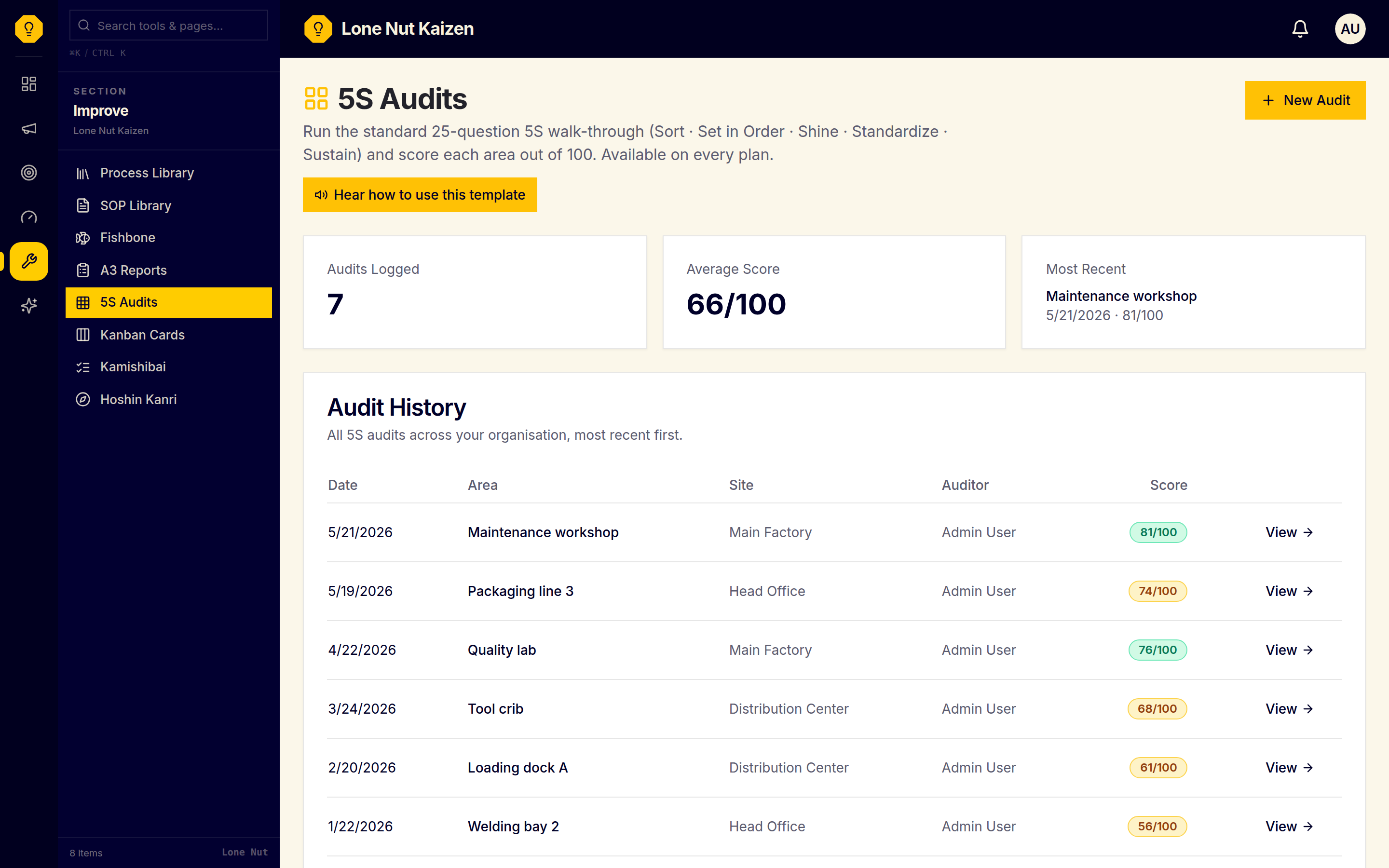
Score Sort, Set in Order, Shine, Standardize, and Sustain out of 100.
5S can become something the team did years ago instead of a standard it keeps checking. Run the 25-question walk-through on the Hirano 0–4 scale, tag the area, site, and department, save optional comments per question, and compare each area's /100 score over time.
The problem to solve
5S walks often end as paper scores or isolated spreadsheets, so you cannot compare areas or see whether workplace standards are holding.
Using the tool
- 1Choose the site, department and area, then open a new 5S walk-through.
- 2Score the 25 Sort, Set in Order, Shine, Standardize and Sustain questions from 0–4 using the on-screen guidance.
- 3Add a comment to any question that needs context, then save the audit.
- 4Review category subtotals, the color-coded /100 score, and the audit history over time.
What stays visible
A comparable /100 baseline and audit history show whether a workplace standard is holding between reviews.
- 25-question template covering Sort, Set in Order, Shine, Standardize, Sustain
- 0–4 Hirano scoring with on-screen guidance for every level
- Per-question comment box for context and follow-up
- Per-category subtotals and a color-coded /100 total
- Audit history filtered by area, site, or department
- Available on every plan and does not use AI credits
Kanban Replenishment Cards
Track the next replenishment handoff.
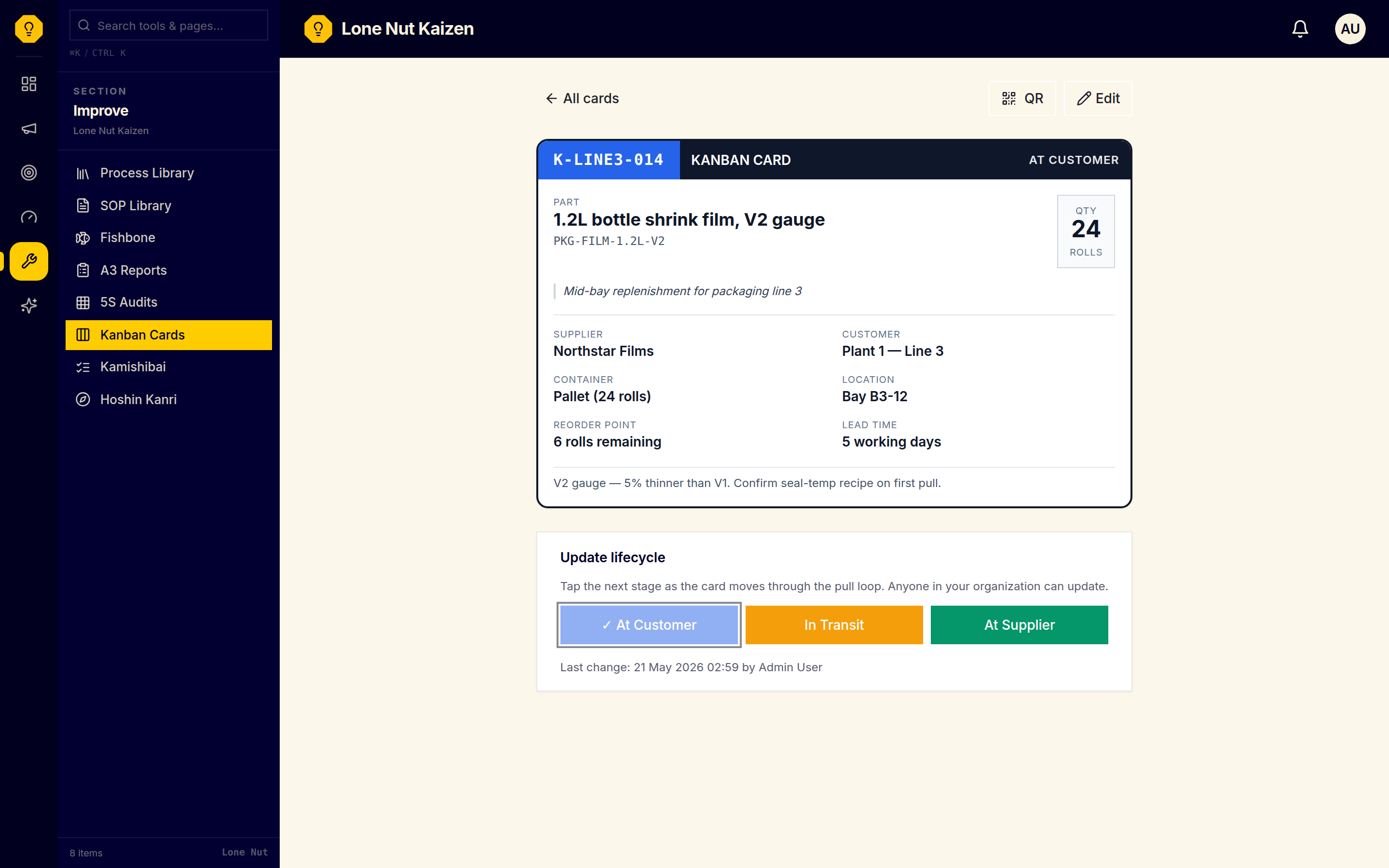
Replenishment stalls when the next handoff depends on a physical card or someone chasing an update. Track parts, consumables, and finished goods through the supplier–transit–customer pull cycle, with each card's unique number, part details, supplier, customer, current status, and a printable QR route to the point of use.
The problem to solve
Material replenishment depends on a physical card or someone chasing an update, so the next handoff can be missed.
Using the tool
- 1Create a card with its part, quantity, supplier, customer and optional location or reorder details.
- 2Move the card through At Customer, In Transit and At Supplier as the pull signal travels.
- 3Use the all-cards view and status filters to see which replenishment loops need attention.
- 4Print a QR card for the bin or container so operators can open the shop-floor view and update the status.
What stays visible
A shared status for each replenishment loop, with a printable QR card that connects the digital record to the physical point of use.
- Unique card numbers, part / supplier / customer metadata
- Three-status workflow: At Customer → In Transit → At Supplier
- Bulk view across all cards or filter by status
- Export-ready details for printing physical bin cards
Kamishibai Audit Boards
See which recurring checks need attention.
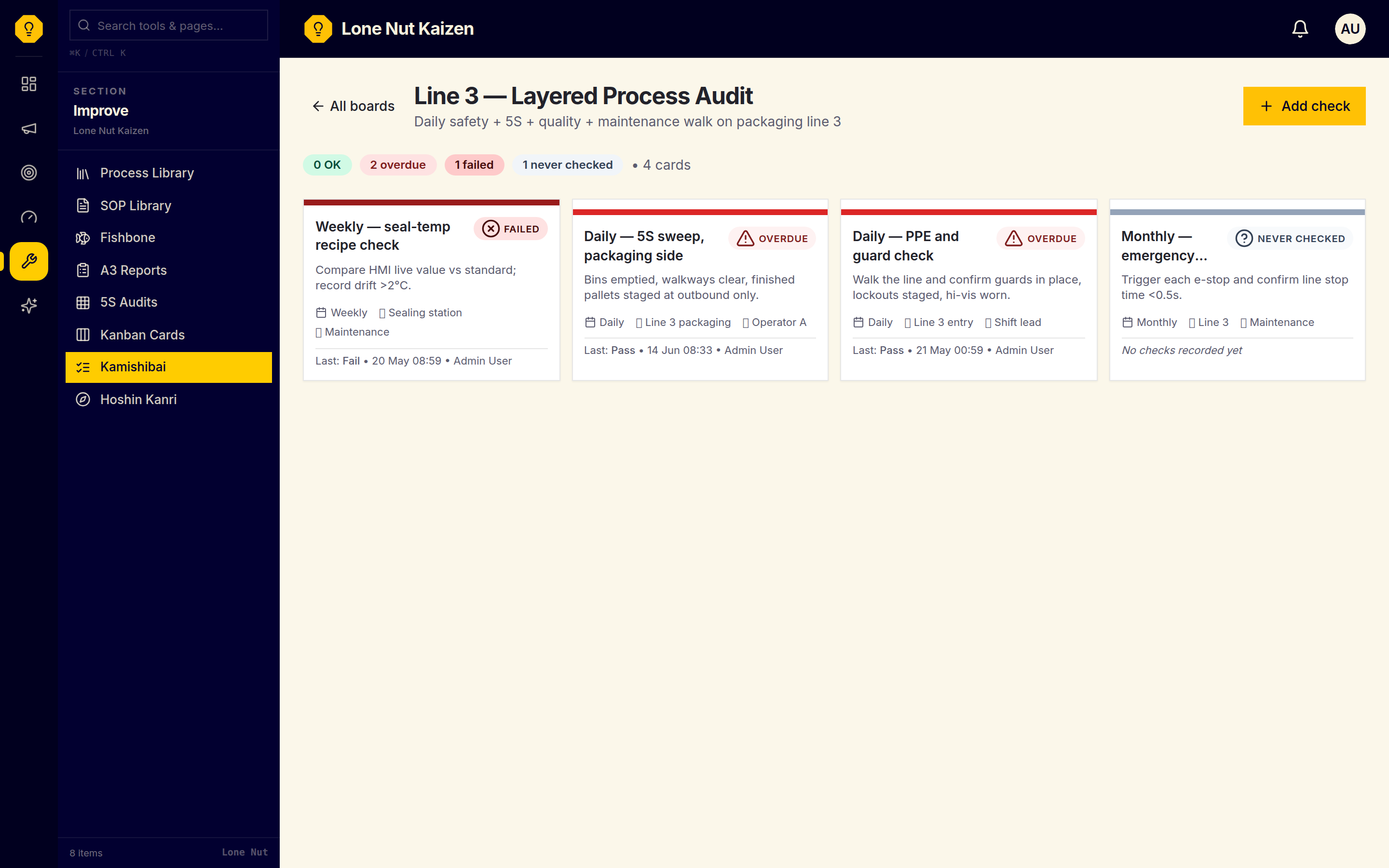
Recurring checks slip when the board is not part of the operating rhythm. Use a digital Kamishibai board for safety, 5S, quality, and equipment checks. Each card shows green OK, red overdue, dark-red failed, or gray never checked based on frequency and check history.
The problem to solve
Recurring checks are easy to postpone when the program lives on a board nobody updates consistently, leaving overdue or failed standards hidden.
Using the tool
- 1Create a board and add each safety, quality, 5S or equipment check with its area, owner and cadence.
- 2Choose a daily, weekly, biweekly, monthly or quarterly frequency for each card.
- 3Record a one-click pass or fail with notes whenever a check is completed.
- 4Review the board's derived OK, overdue, failed or never-checked status and open each card's check history.
What stays visible
The board shows the current status of the audit program and lets the team take an overdue or failed check into the next huddle with its history intact.
- Daily / weekly / biweekly / monthly / quarterly cadences
- Auto-calculated status: OK, overdue, failed, never-checked
- One-click pass / fail with notes to record each check
- Full history per card for audits and trend reviews
Strategy loses its link to monthly action
Connect long-range intent to targets, owners, and countermeasures that can be reviewed throughout the year.
Hoshin Kanri Policy Deployment
Connect long-range objectives to monthly review.
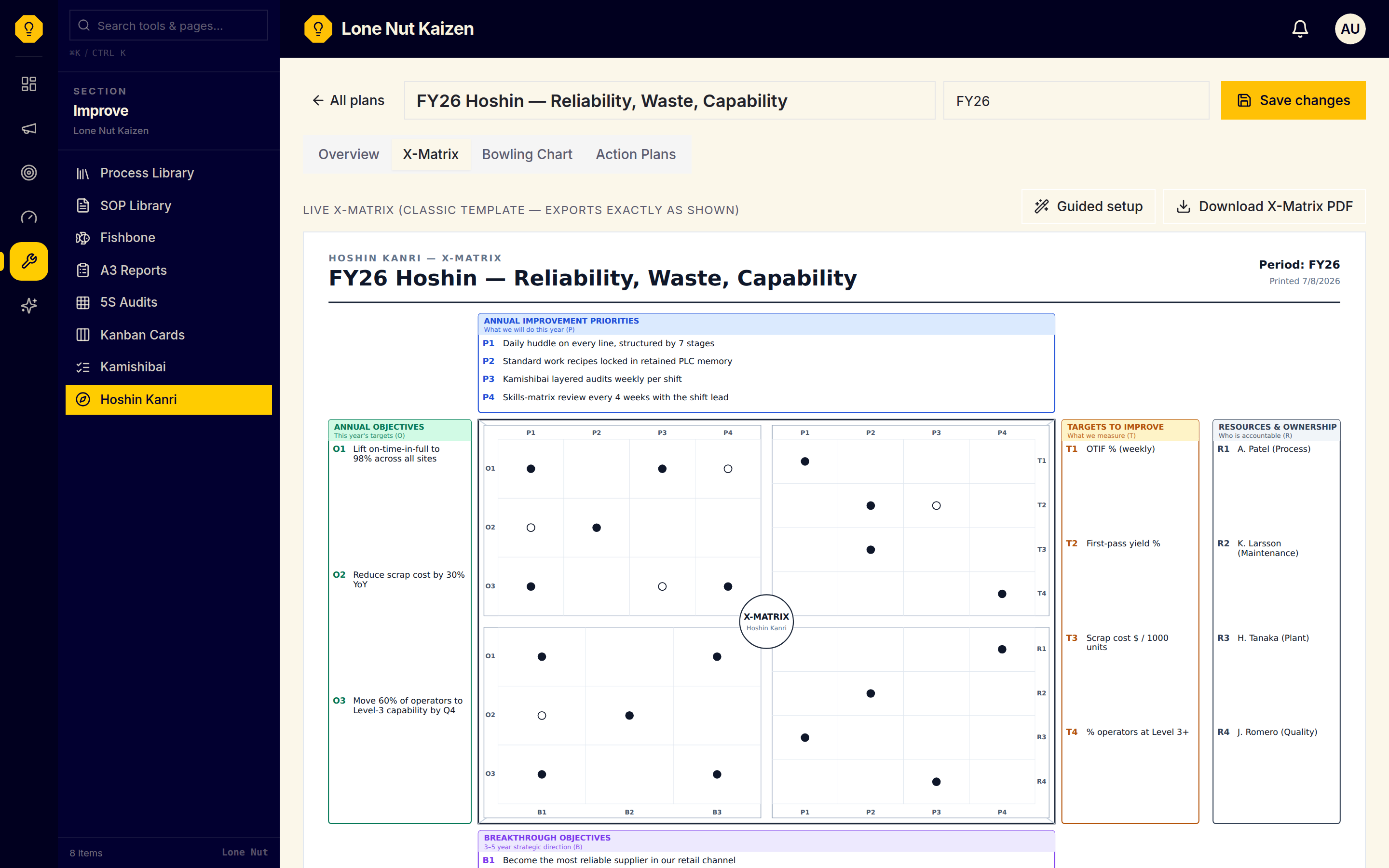
Strategy loses its link to the work between review meetings. Build a Hoshin Kanri plan around the X-Matrix, connect objectives and targets, assign owners, track monthly plan versus actual, and keep action plans and countermeasures with each priority.
The problem to solve
Annual strategy can look clear in a review but lose its owners, measures, and countermeasures in the months between reviews.
Using the tool
- 1Use the six-step setup wizard to capture Breakthrough Objectives, Annual Objectives, AIPs and TTIs.
- 2Connect the X-Matrix quadrants with weak or strong correlations and assign the relevant owners.
- 3Update each TTI's monthly plan and actual values in the bowling chart to surface drift early.
- 4Run each priority through its action plan and raise a countermeasure when an impacted target needs a response.
What stays visible
A connected X-Matrix, monthly bowling chart, and action-plan view keep strategy available in the operating rhythm and make exceptions ready for review.
- Guided 6-step setup wizard: Breakthroughs → Annual Objectives → AIPs → TTIs → correlations → ownership
- X-Matrix with weak (○) and strong (●) correlation marks, ready to print for reviews
- Bowling chart tracks each TTI monthly, plan versus actual, with on-plan and off-plan status
- Per-priority action plans with owners, timelines, and on-track or behind status
- Countermeasures with problem statements and corrective actions when a TTI is impacted
- Overview tab rolls up AIP status, TTI health and open countermeasures for the monthly review